An integrated digital suite for the salon industry.

 SalonSuite
Management software for
barbershops.
From the first booking
to running your salon.
Organize appointments, record sales, and track customers, staff and expenses in one platform, on your phone, tablet or computer.
Explore your everyday tools.
From inside the interface.
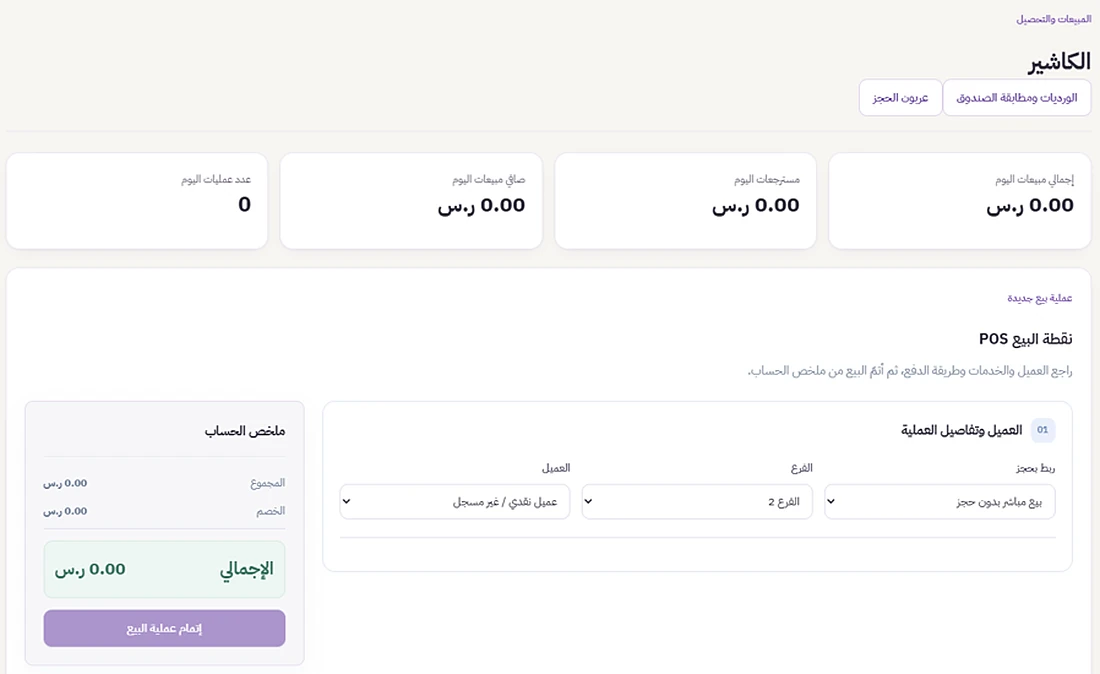
A moving tour of system-component screenshots with demo data. Choose a screen and explore its details at your own pace.
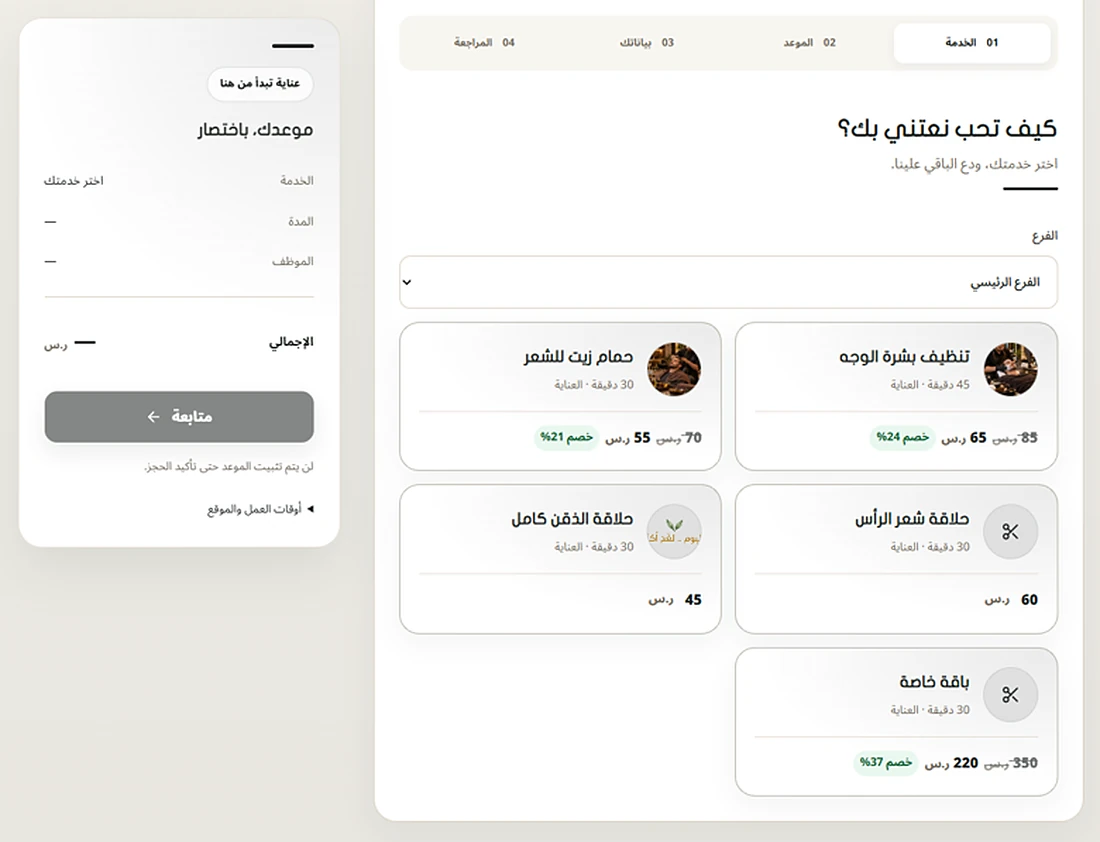
Booking as your customer sees it
Service, price and duration, followed by the appointment, details and review. A clear journey from the first choice.
Try SalonSuite free for 14 days
14 days of Professional-plan access, with no bank card or payment required. Afterwards, choose one of the three plans at current prices. Your business data remains saved; paid messaging and external services are not included in the trial.
Start your free trialFour things every salon owner wants.
SalonSuite is built for them.
Full chairs.Fewer lost appointments.
A branded salon page customers book from any time, deposits that cut no-shows, and a waitlist that fills cancelled slots.
- Your branded salon page with 24/7 online booking
- Booking deposits through Tap, paid straight into your account
- A waitlist that fills cancelled slots, with each barber's hours reflected in availability
Today's visit,next month's booking.
Know your clients, reward repeat visits, and give them a reason to come back and bring friends.
- A profile for every client with visits, purchases and your notes (CRM)
- Loyalty points, memberships and coupons on your own rules
- Gift cards and session bundles that bring in new clients
Every riyal,in the right place.
A checkout that records the sale and issues the invoice, shifts where cash is reconciled, and clear expenses and commissions.
- POS checkout and simplified invoices with ZATCA Phase 2 integration
- Shifts that match expected cash against counted cash
- Expenses, purchases, staff dues and commissions
From one chairto more than one branch.
Reports that show what works, clear permissions for your team, and inventory and a product shop as you expand.
- Sales and collections reports, with Excel export for your accountant
- Roles and permissions for owner, manager and front desk
- Inventory and a product shop, plus two branches and up to 20 staff
Illustrative screens and figures. Features and usage limits vary by plan and salon settings.
One connected workflow.
From start to finish.
Tools for daily operations, keeping oversight within reach.
- 01
Book
Customers choose a service and appointment on the booking page.
- 02
Organize
The team follows today's appointments and delivers services.
- 03
Complete the sale
Record the sale, payments and invoice at checkout.
- 04
Review
Follow customers and operational results using your plan's tools.
The invoice is part of the sale.
Integration is part of the platform.
Activate your business's invoicing unit, sign simplified tax invoices and refund credit notes, and track submission results from ZATCA.
Explore activation requirements- 01
Unit setup
Business and branch details, and certificate request
- 02
Verification and compliance
OTP and invoicing-unit tests
- 03
Activation and monitoring
Production certificate, followed by document issuance and submission
Each business completes activation separately under ZATCA requirements. A subscription alone does not establish integration or invoice acceptance. The workflow shown covers simplified invoices and their credit notes.
The same platform.
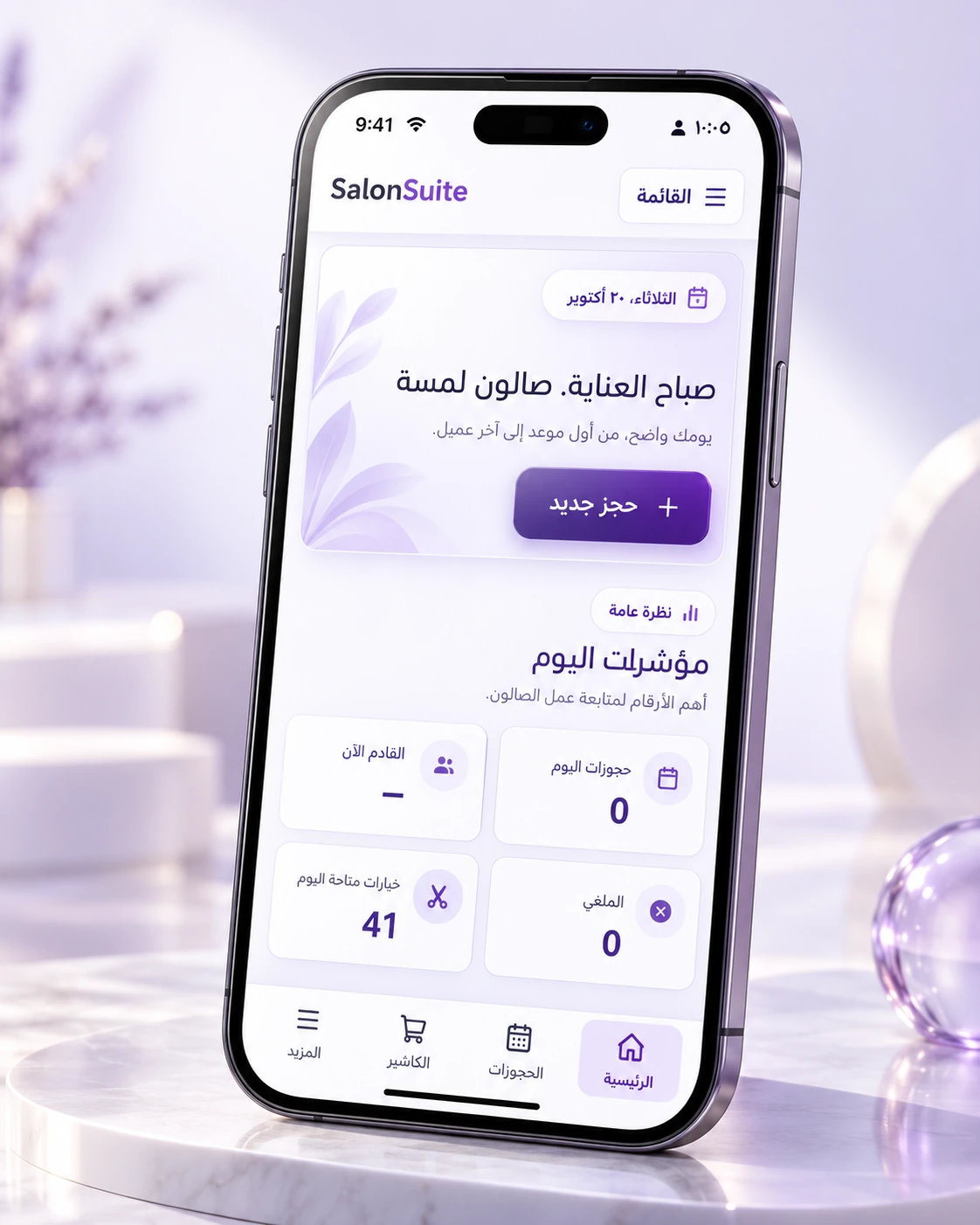
On your preferred screen.
A responsive interface for phones, tablets and computers, with consistent typography and clear workflows. Use SalonSuite in a browser or install the web app on supported devices.
Clarity from the first step.
What you need to know about subscriptions, operations and invoicing, organized by topic.
Getting started and subscribing
6 questions
Who is SalonSuite designed for?
Barbershop owners and their teams, bringing bookings, services, sales and customers together in one platform.
How do I subscribe and start using the system?
Go to the subscription page, choose a plan and duration, enter the required details and complete payment. Activation follows verification of successful payment under the subscription process.
What is the difference between the three plans?
Basic covers daily operations and payments: bookings, POS, shifts, the payment gateway and deposits, and expenses, for up to 5 staff. Professional adds gift cards, service bundles, memberships, loyalty, coupons, CRM, advanced reports, Excel export, purchases and staff dues, for up to 10 staff. Advanced adds inventory, the product shop, commissions and the activity log, for up to 20 staff and two branches.
Are the current prices permanent?
Displayed prices are a limited-time offer. Review the final amount, duration, renewal price and terms on the subscription page before confirming payment.
Are durations other than monthly available?
Yes. Monthly, 3-month, 6-month and annual terms are available, and longer terms save more. See each term's price on the plans and pricing page.
Can I change my plan or cancel my subscription?
Changes, cancellations and renewals follow the subscription policy and terms shown at purchase. Review them before subscribing and contact support with account-specific questions.
Services and daily operations
12 questions
Can customers book appointments themselves?
Yes. After you set up your salon and available services, customers can use its booking page to choose a service and appointment.
What does point of sale (POS) mean?
It is SalonSuite's checkout software for recording services, sales and payments and issuing invoices. It is separate from an online payment gateway or card payment terminal.
Can I take a deposit or online payment from customers?
Yes, on every plan after you connect your salon's own Tap account in the Payment gateway section. The system asks for the deposit on online bookings, money goes straight to your account, and Tap's fees are separate from the plan.
Does it support gift cards and service bundles?
Yes, on Professional and Advanced. Each gift card has its own link and its balance is used at the cashier in full or in parts; a service bundle is a set number of sessions at one price, shown to customers as a voucher in your salon's color.
Does the system combine bookings and checkout?
Yes. Booking, services and customer tools are combined with checkout and sales recording, so you can follow salon operations from one account according to your permissions.
Can I sell products and track stock?
Products, quantities and stock movements are included in the Advanced plan, helping you review product movements associated with operations.
Does it support memberships, loyalty and coupons?
Yes. These tools are included in Professional and Advanced. Coupon rules can prevent combining a coupon with an already discounted service price.
Can I track staff commissions?
Yes. The Advanced plan includes tools for tracking commissions associated with the team's work and sales.
Does every staff member have the owner's permissions?
No. Access depends on user roles and permissions. Owners, managers and reception staff have access to the appropriate sections and actions for their role.
Can I manage more than one branch?
Basic (up to 5 staff) and Professional (up to 10 staff) include one branch; Advanced includes two branches and up to 20 staff. Check the plan limits when you subscribe.
Which plans include CRM and advanced reports?
CRM, advanced reports, Excel export and review follow-up are available on Professional and Advanced, within each plan's scope.
Which plan includes purchases and staff dues?
Expenses and cash surplus are on every plan. Purchases and suppliers, staff dues and advances are on Professional and Advanced, and the activity log is on Advanced.
ZATCA and e-invoicing
6 questions
Does the system support ZATCA Phase 2?
Yes. It includes invoicing-unit activation, compliance tests and a production certificate, linking simplified invoices and refund credit notes to checkout and tracking their submission to ZATCA.
Is my salon connected automatically when I subscribe?
No. You must configure salon and invoicing-unit details, complete the verification code and ZATCA compliance requirements, then activate the salon's production certificate.
Do I need business-specific details or a certificate?
Yes. Integration uses the business, branch, invoicing unit and their own certificates. Another salon's integration cannot activate yours.
Which invoices does this integration cover?
The checkout workflow shown here focuses on simplified tax invoices and refund credit notes. Confirm your business's needs before operation if other invoice types are required.
Can I see the result of submissions to ZATCA?
The system tracks document submission status and responses, retaining compliance evidence and ZATCA responses for review. Some cases may need follow-up before they can be considered complete.
What is the difference between compliance testing and live operation?
Compliance tests the unit's documents before activation. Live operation begins after the production certificate and salon-specific unit activation are complete, followed by monitoring real sales-invoice submissions.
Devices and support
4 questions
Does the system work on phones, computers and tablets?
Yes. You can use a browser on these devices, with layouts that adapt to screen size.
Do I need to download an app from an app store?
You can use it directly in a browser. It also supports installation as a progressive web app (PWA) on compatible devices and browsers.
Does the system work without internet?
Using services, synchronizing data and connecting to ZATCA require internet access. Installing the web app does not make all services available offline.
How do I contact support?
Open Support from the dashboard after signing in, and include details of your issue so the team can help.
Manage your salon with clarity.
Build what comes next.
Choose a plan, complete your salon details and set up your tools in one place.
Plans start from 69 SAR per monthCompare plans and limits